
Last Updated on November 1, 2026 by Daniel Osakwe

- Before cleaning, always turn off your pc and monitor.
- Avoid using too much moisture, especially when cleaning around ports and plugs.
- Utilize soft, lint-free microfiber towels; avoid using anything abrasive or harsh.
- Never spray the cleaning solution onto your screen directly.
- Use a cloth to wipe the screen clean after misting it onto the cloth.
- Know what kind of screen you have, and if you’re unsure, check the manufacturer’s instructions for cleaning.
- Since many bacteria are stored on the surfaces of your mouse and keypad, it doesn’t hurt to wipe them down at the same time that you clean your screen.
- When it comes to eliminating dust, using a dry microfiber cloth is always the safest option.
Click here to buy the Best Screen Cleaners for Phones, Laptops, and TVs
Comparing Mac and PC screens
Are there distinct factors to take into account while cleaning a Mac versus a PC screen?
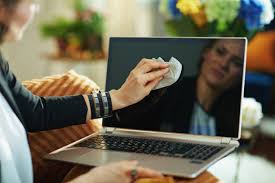
In a word, yeah. Although there are countless diverse computer and monitor models to take into account, screens are typically either non-LCD glass-coated or backlit LED produced with LCD (liquid-crystal display) pixels. Just to add, some of the most recent matte glass screens are nano-texture glass, which should only be cleaned with a special cleaning cloth provided by the company.
Although cleaning detergents can harm LCD panels more easily, there are many simple-to-use products available to clean them due to their widespread use on laptops and standalone computer monitors. They aren’t difficult to clean, but you’ll need to be watchful and cautious to avoid harming the surface or any of the LED components.
Any cleaner with ammonia will leave behind a film. Both soap and water can harm things. If you need a quick cure, use a microfiber cloth lightly sprayed with a solution of vinegar and distilled water. It’s always best and safest to use an LCD cleaner free of alcohol, ammonia, and acetone to clean an LCD screen.
The majority of Mac computer displays are glass-coated and can be cleaned and made streak-free more readily than LCD goods using glass cleaners like Windex or cloth lightly dampened with rinses. You must use the specialized cleaning cloth sold by Apple to clean glass displays with nano-texture on devices like the iMac or the Apple Pro Display XDR.
- Unplug your gadget and turn it off.
- Start by using a dry microfiber towel to wipe away any dust from the screen.
- Avoid using bleach for cleaning non-porous surfaces like the screen that have fingerprints and smudges; instead, use pre-moistened alcohol wipes or Clorox Disinfecting Wipes.
- Avoid allowing any extra moisture to wick from the wipe or cloth as you wipe the glass surface and edges.
- Let the screen dry naturally.
- Utilize a microfiber cloth to rub away any lingering traces.
- Unplug your gadget and turn it off.
- Utilize a dry microfiber cloth to remove any dust.
- Use an LCD cleaning spray on the dust-free side of your microfiber cloth to remove smudges and stains from the screen’s surface. A simple home remedy is distilled water and white vinegar mixed in a ratio of 1:1.
- Thoroughly wipe the surface, being careful not to saturate the screen’s edges.
- Let the screen dry naturally.
- If there are any lingering streaks, buffing them away with the dry edge of the microfiber cloth will also help.
Conclusion
Here’s a final note about the best way to clean a computer screen. Even if your computer screen is clean, your computer’s case will probably need to be cleaned also. You’ll want to be sure to clean the inside of the case.
Note: if cleaning your computer screen seems difficult for you, don’t be shy to ask for help. It might only cost you a few dollar$.


