Last Updated on November 1, 2026 by Daniel Osakwe
GoTouch Basic 3.0 Interactive Whiteboard Review
When you are presenting your big idea to your team or coworkers, have you ever wished you had something to draw on during a meeting? Would you like to share notes openly, but you only have a TV or a projector nearby, but no PC with an app to pull it off? Perhaps you need to have a quick meeting at the hotel before your team goes on a trip to sell your product in a new city. Sometimes it would be nice to have a good old-fashioned whiteboard to doodle on, as they never fail to entertain, right?
Now you can use any smartphone or tablet you have handy. With that smart device of yours, and any display – be it a monitor, TV, or projector – you’ll be good to go. Now, you’ll need to connect your smartphone or tablet to the screen via HDMI adapter or wireless sharing (MHL, Chromecast, etc. Everyone got it together so far? Great. Now you’ll need to pick up a GoTouch by Anyractive.
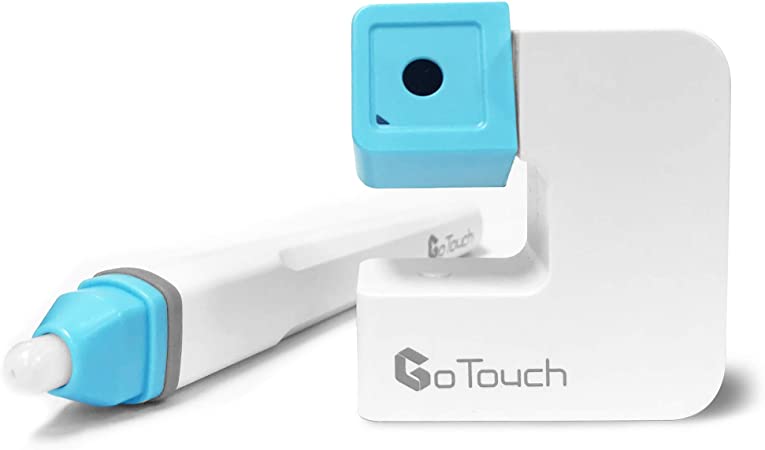
Using the GoTouch pen/camera combo, you can turn your display into an interactive whiteboard that can be used to draw on via Bluetooth. The camera tracks where you move the pen by using an infrared 4K sensor. What a great idea, huh? It doesn’t end there. By using their app, you can share PDFs, images, websites, powerpoints, videos, and much more. These items are all available for doodles.
When testing this out, we were of course on our best behavior. Using this device, no devil horns were drawn onto the faces of others. OK, maybe that’s not entirely true. During our testing, there were many horns and mustaches present, as well as cartoon eyes and ears. Quite a bit of entertainment from this whiteboard, which goes so far beyond the typical whiteboard experience. Your presentation will not only be the highlight of the meeting, but you will also be the talk of lunch, giving your attendees something to talk about.
I was able to easily connect everything since I was only pairing my GoTouch with my device and sharing the screen of my device. So basically, all you’re doing is drawing and controlling everything on your tablet with the pen, and the display sees what you’re doing.
From within the app, you can pair the GoTouch with your device. You can turn on Bluetooth by tapping the G icon at the bottom, going to “Settings” and selecting “Bluetooth”. The camera should show up as long as it is powered on. It’s that simple. You can now share your device with the display.
Table of Contents
GoTouch Basic 3.0 Interactive Whiteboard: Set up
Cameras should be positioned at a 45-degree angle with the screen and 1.5 times as far away from the screen as you are using. With the 45-degree angle, the camera can see what’s happening at the display even if you’re standing close to it. Using the camera, the app can detect the position of the pen on the display, and respond in the app as if the display were a touchscreen. With the pen, you can draw or select items, such as menus and so forth. Each item is wireless, and you charge the camera with a micro-USB cable. Depending on the battery level, you can use the device for up to 4 hours.
As soon as everything is connected, it will run you through a 4-point calibration to ensure that the pen is tracked properly. With the app, you can choose what content to display or just a basic whiteboard.
Furthermore, if some of your participants are located in another part of the world, you can also share your screen with them.
Although it isn’t perfect, the accuracy isn’t bad at all. We did have a few cases of weird handwriting, but we were able to get it done. Additionally, I enjoyed drawing on images and videos. I can imagine how helpful it would be when explaining something visually.
Cons
Several improvements need to be made to the app itself. Despite doing its job, it crashes quite a bit. In most cases, when opening an image or when you jump out of the screen to multitask and return, it crashes. As soon as the product launches, I’m sure they’ll have worked out most of the bugs.
Pros
You can leave the camera and pen on your desk, meeting room table, or in your conference room, next to your Cisco or Polycom phone. They join together and stand up straight so they can easily be stored. The setup is simple and it only takes a few seconds before you are prepared to present.
Right now, the GoTouch is only compatible with iOS and Android, but in March, they will ship out a 2.0 version that will also support Windows, including PCs. We used an Android tablet and application to conduct all our testing. Pre-ordering is currently available via Kickstarter and Indiegogo (or by visiting anyractive.com).

Conclusion
Setup costs you no more than a few dollars, and it works rather well. A company of any size can take advantage of this, as well as an individual worker, without putting their budget at risk. As long as they keep working on the software, accuracy will only improve. In addition, it is hoped that crashing on Android will be eliminated by the time it is released.
I think we can all agree that many companies will want one of these. If the meeting room is in the hallway outside the actual meeting room or a Holiday Inn Express, it makes for a wonderful companion. Our rating for it is 7 out of 10, and it can easily gain some more points once the new model launches fully supporting Windows.