Last Updated on November 1, 2026 by Daniel Osakwe
The Denon HEOS AVR is one of the latest entry-level 4K AV Receivers available on the market. Its high price makes it a must-have for serious movie buffs and hardcore music lovers. But is its performance up to par with its price tag? Find out in our full review!
Table of Contents
What is the HEOS AVR?

With the HEOS AVR, Denon seeks to create a more straightforward AV receiver that will appeal to more consumers. In spite of the explosion in the market for soundbars, consumers are still rarely considering multichannel AV receivers. Although consumers may be looking for better sound than what can be provided by their TVs, most people rarely consider the soundbar as an alternative.
Their reasons are many, but mainly they don’t like to have speakers throughout their lounge, and they dislike excessive connections, rows of controls on front panels, and the complexity of setting up an AVR. AVRs need to be designed in an entirely different way for the product to truly appeal to a mass market. By using lifestyle products as a source of inspiration, a manufacturer can create an AVR that is suited for mass-market consumption.
This is what Denon has accomplished with the HEOS AVR; a product that is instantly obvious as being different from anything else in its class. There is a simpler design, an improved finish, and fewer connections at the back that are actually used by most users. Front panel buttons are not arranged in rows, the display is simple and there are no on-screen menus.
With this multiroom capability, HEOS AVR is the ace in its hand. Aside from supporting Denon Multiroom, the HEOS AVR can also support wireless rear speakers and subwoofers. You may take a more traditional route by using the five channels of built-in amplification, but you can also remove most of the cabling by using the HEOS Subwoofer and HEOS Speakers.
Although the HEOS AVR supports Dolby TrueHD and DTS-HD Master Audio, it is limited to 5.1 channels, so there is no 7.1 or immersive audio setup, but that is rather the point. With a suggested price of £799, as of the time of writing (August 2017), the HEOS AVR offers something unique instead of a fully immersive audio AV receiver with DTS:X and Dolby Atmos. Let’s see how easy it is to set up and use the HEOS AVR, and, more importantly, how good it sounds.
Denon HEOS AVR AV Receiver: Design

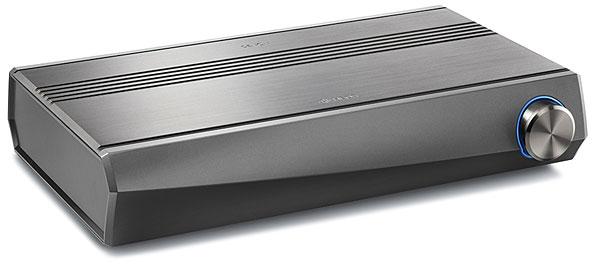
The HEOS AVR is not a conventional AV receiver as soon as you see it. It’s designed to be less intimidating, so there are no screen or front panel controls. Furthermore, there is no drop-down flap with buttons behind it. In fact, there isn’t even an input selector dial on the front of the HEOS AVR, it only has a volume dial, an indicator light under the front panel, and an IR receiver hidden in the front foot. Thus, Denon’s new receiver immediately looks less intimidating and has a more lifestyle feel to it.
The minimalist design incorporates a gunmetal finish and clean lines, as well as aluminum construction with an extruded design. As a traditional big black AV receiver, the HEOS AVR is certainly going to be less attractive and unobtrusive in most living rooms. A solid chassis measuring 434 x 90 x 277mm (WxHxD) weighs in at 6kg. In addition to a solid chassis, the HEOS AVR also feels well made.
There are only two controls on the front: one for volume and one for a light
Denon HEOS AVR AV Receiver: Connections & Control

As with the front of the HEOS AVR, Denon has taken a minimalist approach to the rear, which is designed to be more user-friendly than traditional AV receivers. In our AVR reviews, we have frequently commented that manufacturers include too many connections that won’t be used. Denon apparently takes our advice seriously by providing fewer legacy connections.
With only four inputs and one output, the HEOS AVR has virtually no legacy connections. While we believe this is a good approach, we have been primarily using HDMI for the past decade. If we were being churlish, we might say that we would prefer one or two more inputs, since these days it’s easy to exceed four HDMI sources. Although all inputs and outputs support 4K/60p, 4:4:4, Wide Colour Gamut (WCG), High Dynamic Range (HDR), as well as Audio Return Channel (ARC) and CEC (Consumer Electronics Control). An update to the firmware in September will enable support for Hybrid Log-Gamma (HLG) and Dolby Vision for the HDMI input and output.
In addition to the optical digital input, the player also has a coaxial digital input, RCA connectors for stereo analog input, 3.5mm jacks for analog input, and a USB port. This device also has an output for connecting a wired subwoofer (although you can use a wireless subwoofer as well), an IR connector, and a button for connecting to your network. The receiver also features wifi and Bluetooth built-in, as well as an Ethernet port. Lastly, the binding posts for the five built-in audio channels are easily accessible, and they are color-coded for easy identification, although you can still use wireless surround sound.
Denon’s remote control takes their pared-down approach to the extreme and we may feel they went a bit too far here. It is small, fiddly to operate, and easily lost in a sofa’s back. It has a very similar design to the receiver itself. Besides on/off, mute, input selectors, volume up/down, play/pause, and forward/backward, there are very few buttons on the remote.
The Denon budget AV receiver remotes are very nice and, although simplified a bit, they also offer a lot of control options. Unfortunately, the provided remote cannot be used to control the HEOS AVR over a long period of time. Instead, you can use your TV controller with ARC or the HEOS App, which we will discuss later in this review.
Connections are stripped down, but the remote is extremely basic
Denon HEOS AVR AV Receiver: Features & Specs
HEOS AVR boasts the main feature of its name as well as its design and deliberate simplicity. The AV receiver is designed to be a key component in Denon’s HEOS multiroom system, making the setup more flexible. HEOS has 5 built-in channels for amplification, capable of delivering 50 watts each into 8 ohms, but its unique selling point is the ability to deliver wireless surrounds and a wireless subwoofer, giving users a 5.1-channel experience.
This means you can set up the HEOS AVR in a number of different ways such as 2.0 (default), 2.1 (subwoofer under the built-in front speakers), 3.1 (center speaker), and 5.1 (surround speakers on wired or wireless). Subwoofers can be either active wired models or wireless HEOS speakers, while surround speakers can be matching the left, right, and center speakers or the HEOS HS1 or H2 speakers.
Dolby TrueHD and DTS-HD Master Audio are supported by up to 5.1 channels by the HEOS AVR. However, immersive formats or pre-outs are not supported.
As well as being able to run a semi-wireless 5.1-channel setup, the Denon HEOS AVR is also compatible with Denon’s HEOS multiroom system, which allows users to listen to other Denon HEOS devices connected to the network on the HEOS AVR and vice versa.
HEOS multiroom system has already been reviewed extensively and we were very impressed. You can control the HEOS AVR and other HEOS devices through the HEOS App, available for both iOS and Android. With the HEOS App, you can also access music streaming services like Mood: Mix, Spotify, YouTube, TuneIn, Tidal, Napster, and Deezer.
Denon HEOS AVR AV Receiver: Setup & Testing
While the AVR is very simple to set up, we should note a few points before going into further detail. As previously mentioned, the remote is very simple and there is no display on the AVR but there is also no display on the screen, which is a shame because Denon’s on-screen display and menu system are excellent. All the setup and control of HEOS is done via the HEOS app, which is a very powerful tool.
In addition, there is no auto-EQ with the dedicated microphone in the app, despite having a Setup Assistant. For this reason, you will need to measure the distance from the sweet spot to the speakers and subwoofer, and you should use a Sound Pressure Level (SPL) meter to measure the volume levels. Nevertheless, you can download the HEOS AVR app for free these days so it is not too complicated to set up the device.
HEOS AVR was first tested with a wired 5.1-channel setup consisting of floor standing left and right front speakers, an active subwoofer, a full range center speaker, and two surround speakers. We then created a 5.1 system using three JBL Control Ones, a wireless HEOS Subwoofer, and two wireless HEOS HS1 Wireless Speakers – we thought the Control Ones and the HS1s would work together well.
As well as testing the HEOS multi-room system, we also had a HEOS H1 Wireless Speaker placed in another room. After that, we used the HEOS AVR with various Blu-ray and Ultra HD Blu-ray soundtracks along with CD, Spotify, and Tidal music sources.
As part of the HEOS Multiroom System, we have previously reviewed the HEOS HS1 Wireless Speaker, as well as the HEOS HomeCinema soundbar in its original version.
In addition to dual 5.25″ long-excursion woofers, it also features Class D amplification and can be installed vertically or horizontally. The crossover frequency is determined automatically based on application, and the level and phase can be adjusted via the HEOS App.
There is no networking involved, they are connected directly to the HEOS AVR via a 5GHz frequency that has a 10-meter range and is latency-free. It’s worth pointing out that although there are no cables connecting the HEOS AVR to the HEOS Subwoofer or the HEOS HS1 Wireless speakers, you will still need convenient wall sockets in which to plug them.
With the app, you can find all of the HEOS speakers connected to the multi-room system under My Devices. Your AVR, Sub, and other Speakers can then be seen and controlled via the app after they are added to your network.
The app also lets you connect a subwoofer and surround speakers wirelessly rather than via wires, and name them (such as Subwoofer, Surround Left, and Surround Right).
Using the app is like using the rest of it. It’s intuitive and easy to use. On the Now Playing screen, you can view the current Sound Mode (Auto, Direct, Stereo, and various DTS and Dolby modes) as well as the current Input Source, which allows you to quickly switch to other sources or modes and control the volume.
Using the SPL meter you can set the distance in feet or meters as well as the levels. For the HEOS AVR, there are menu options such as a Setup Assistant (that is very helpful), EQ (bass and treble), the ability to select TV input, customize the remote control, set up TV sound groups, and configure the speakers (distance, levels, and impedance), name Quick Select options, and optimize networking capabilities of the HEOS AVR.
The HEOS Remote App is entirely responsible for setting up, selecting, and controlling your system
Performance
As a 5.1-channel receiver with a spacious and rounded sound stage, the HEOS AVR is a very good receiver. Even though the built-in amplifier isn’t very large, it’s enough to power most living room speakers and our home cinema floor standers without issue. If not taken too far, it has enough headroom to give the content some headroom without losing steam. Our test disc Dawn of the Planet of the Apes, which is our favorite, sounded amazing with the setup, as did the sound mixes from Pacific Rim and Interstellar.
Since the HEOS AVR has few EQ features, you will need to position your subwoofer carefully to ensure even low frequencies with even HEOS AVR bass. Despite the lack of precision on the part of the effects, the surroundings were lively. While it doesn’t have the best surround performance, you have to consider the receiver’s intended audience when evaluating its performance. Similarly, we found the AVR to be a very capable performer with music in 2.0 direct mode, which we found to be great news since the multiroom system we’ll be using will rely on the device.
In a wireless surround sound system, the HEOS AVR’s wireless capabilities are what really make it stand out since it’s manufactured and designed by Denon. Adding five wired speakers, two wireless speakers, and a wireless subwoofer to the system was a very straightforward process. We were amazed to find that our chosen speakers actually worked quite well, with a nice tone balance and engaging surround sound field with no latency.
In addition to ensuring zero delays, the HEOS app optimized the connection to ensure a seamless experience. Because the wireless rear speakers were in sync with the wired front speakers, the experience was basically the same as when using all wired speakers (allowing for the size difference in speakers). As a solution for someone who does not intend to run wires throughout their lounge, the HOES Subwoofer did an excellent job of providing bass depth to the smaller speakers that comprised the rest of the system.
AVR and receiver from HEOS are also very well integrated with the multiroom system of HEOS and worked well with one another. In another part of the house, we were able to listen to sources connected to the AVR as well as sources connected to another part of the network. Multiroom systems are becoming more popular, and we have found HEOS to be a very good performer with an excellent remote app.
As an alternative, there is TV Sound Grouping, which is separate from HEOS music and can be used to play TV audio over ARC, HDMI, optical or coaxial connections in the main room provided the AV sync is maintained. HEOS’s normal delay for TV sound is about two seconds, so you will hear an echo between devices in other rooms without the TV sound grouping feature.
Even a 100ms delay allows playback without a noticeable echo in the home if the network is excellent. The TV Sound Group enables one to reduce this delay to 40ms if the network is excellent. The 100ms delay will be audible if you put all speakers in the same room, but that’s not the intended use of the system. TV Sound Group requires an excellent network connection for the master device and Denon strongly recommends the use of a cabled connection.
| Pros | Cons |
| A great receiver with great sound quality | There is no automated setup or EQ |
| Subwoofers and wireless speakers can be used together | The screen and receiver don’t display any information |
| Multiroom capability | Remote control has a very basic design |
| Design with a minimalist aesthetic | |
| Setting up and connecting is simplified | |
| An effective remote app |


