
Last Updated on November 1, 2026 by Daniel Osakwe
Do you often forget your keys when you leave your house? Yale Assure Lock SL offers keyless smart locks that are wirelessly connected to your Wi-Fi and August app via an August Connect module.
Additionally, this lock is also compatible with Apple HomeKit, Google Home, and Alexa, allowing you to operate or check the lock from your phone, an Amazon Echo, or a Google Home. It’s one of the best smart locks you can get that doesn’t require a key because as long as you remember the code, you won’t get locked out.
Table of Contents
Yale Assure Lock SL: Price, availability, and design
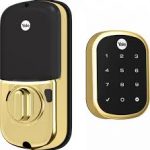
Aside from a single touchpad, the only element that faces outwards on this deadbolt is a small, simple panel. You can choose from four finishes: black, brass, bronze, or satin nickel.
In addition to the Assure lock, Yale also offers several variants: Yale Assure Lock Touchscreen ($149) features a traditional keyhole under the touchscreen. Yale Assure Keypad ($129) is a keypad that comes with a physical key slot and Yale Assure Lever ($169) comes with either a touchscreen or a keypad.
Using a Wi-Fi or smart home hub is the only way to remotely control the Assure Lock SL. In addition to the Yale Wi-Fi and Bluetooth upgrades, you can also purchase the Yale Assure Lock SL with Z-Wave ($210) or the Yale Assure Lock SL with Wi-Fi ($265).
You can touch the keypad and it lights up, but you cannot operate its keys manually. The device is chatty and offers beeps and voice prompts to inform you of what’s happening. Upon touching the keypad, a chirping sound is heard. It announces “Time expired” when you take too long to enter a keycode.
A common problem we noticed was that it often took a couple of touches for the touch screen to wake up. If it is not touched for a few minutes, the lock enters a standby mode, which can be woken up by touching the touchpad. Unfortunately, it doesn’t always work like this, as we often had to touch the screen or use a palm touch to wake it up.
Yale Assure Lock SL: Setup and installation
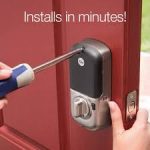
Installing an exterior door was straightforward and simple, taking about 25 minutes. There is a large compartment on the back of the lock that holds four AA batteries and the locking mechanism. The design is attractive and rounded, but it takes up a good amount of space on the back of the door.
An interesting feature, called DoorSense, detects when the bolt has slid into place by using a magnet mounted on (or embedded in) the doorframe. It can therefore detect if someone has opened a door but left it unlocked. Although the lock won’t automatically close for you, this feature provides useful peace of mind that you have triggered the lock correctly.
With the addition of the August module, the lock can now store up to 250 key codes, which should be enough for most people. Alternatively, they can be stored in the app as keys or as keycodes. In either case, they can be set to allow access only during certain hours, on certain days, or for just one use.
Is it possible for the battery to die while you are outside? By connecting a 9-volt battery to the keypad’s bottom, you can temporarily boost the lock’s electrical power, allowing you to gain entry.
Yale Assure Lock SL: Smart home compatibility
The Yale Assure SL can use all of August’s smart-home capabilities because it links with the August app, so you can, for example, connect it with August video doorbells. Aside from Alexa, Google Home, and Apple HomeKit the Assure Lock SL also works with Amazon Echo.
| Pros | Cons |
| A simple, elegant design | Sometimes touch screens don’t respond until several touches are made |
| Support for Alexa, Google Assistant, and HomeKit | Security can be compromised due to the lack of number randomization |


Verdict
Yale Assure SL smart locks are a good choice for anyone looking for a keyless smart lock. It has a beautiful design and works with the majority of modern smart home platforms. You will need an additional module if you want to remotely operate the lock. Our review of the Level Bolt is a great choice for a less conspicuous HomeKit lock.
It should have the same security feature as the Kwikset Obsidian (which requires you to enter extra digits before entering your code). In our analysis of the best smart locks, we like the August Wi-Fi smart lock best overall, but we like the Assure SL best for keyless access.


