Last Updated on November 1, 2026 by Daniel Osakwe
Logitech C920x Pro HD Webcam Review
Pros
- On a budget, great quality
- Constructed with sturdiness and dependability in mind
- The lens is great
Cons
- The white balance is a little off.
- 30fps framerate
- No variable FOV
For a few years now we’ve been singing the praises of the Logitech C920x HD Pro webcam, and now it’s time to take it on for a spin.
The C920x HD Pro is the latest in the family, and it packs some nice upgrades over the C920x, with a higher definition 1080p video feed, the option for a dual-array microphone, and the ability to capture 1080p HD video.
The Logitech C920x HD Pro is a very solid webcam that has some great features and well-designed hardware. However, it’s also priced a little higher than other webcams, so it may not be the best choice for those on a tight budget.
Table of Contents
Logitech C920x Pro HD Webcam: SPECIFICATIONS
Here are the specifications for the Logitech C920:
- Connection type: USB-A
- Image resolution: up to 15 Megapixels
- Video Resolution: 1080p at 30 fps / 720p at 30 fps
- Microphone: Stereo
- Still Image Resolution: 1920×1080
- Image Quality Settings Customization: Yes
- Diagonal Field of View (FOV): 78°
- Focus Type: Auto
- Mounting Options: L-shape joint
- Cable Length: 1.5 meters built-in cable


Logitech C920x Pro HD Webcam: Design
- Sturdily built
- Outstanding design
- Easy to install
- Portable
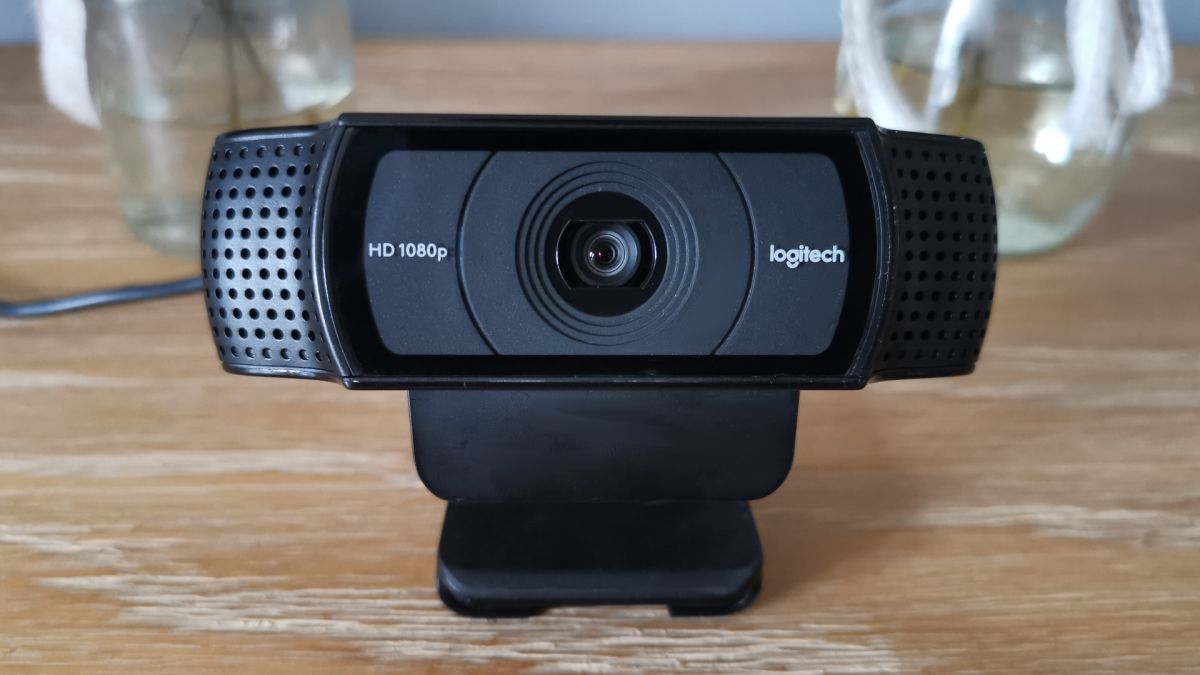
Even though the design isn’t groundbreaking, its bar design is instantly recognizable, to the point that many other manufacturers probably took inspiration and adopted a similar look. There is a camera lens in the middle of the ‘bar,’ LED lights that illuminate blue when the camera is turned on and microphones on both sides.
Unlike the C920s, the C920 doesn’t come with a built-in lens cover, but you can easily find one online (unofficially, as Logitech doesn’t sell them).
The claw-style grip fits easily onto most laptop and PC monitor screens, but you may also attach the mounting clip to a tripod if you prefer not to cover your display.
If you already own a tripod, it’s a fantastic way to be creative with your camera angles if you broadcast in a cluttered environment.
Since there is no detachable USB-C cable like the Logitech Brio, the 1.5m USB-A cable is built into the back of the device, which makes carrying it a little difficult, but this is standard practice for non-streaming webcams.
Logitech C920x Pro HD Webcam: Performance
- Great for streaming
- Great video output
- The autofocus is great
- Compactable with all operating systems
- Easy to install and use.
The C920 is simple to set up; simply plug it into your computer or laptop and you’re ready to go. It’s compatible with Windows 7 and higher, macOS 10.0 and later, and Chrome OS, giving you some flexibility with your devices and operating systems.
The quality of the camera is outstanding right out of the box. Though the colors appear cold, you can adjust brightness, saturation, sharpness, and contrast with the free Logi Capture software, so the cooler hue can actually make a room appear brighter if left alone.
Our review compares it to the Logitech C310, a budget 720p webcam aimed at bargain hunters, and the ultra-powerful Logitech Brio in both 1080p and 4K resolutions. The C920 demonstrates why it is one of the most popular cameras on the market at this point. The device was tested with its factory settings on all images.
With its limited 60° field of view, the C310 is far from being a true competitor, because it must be much closer to its subject. Likewise, the 720p output at 30 frames per second means that the filming quality is significantly less than that of the C920.
In a similar vein, while the Brio can capture footage in 4K, most conference calling software does not support the resolution, so buying one for regular business calls would be a costly investment. Even though the Brio’s visual quality is noticeably better when set to 1080p / 60fps, the video quality isn’t as good as the C920.
The built-in microphones aren’t the best, but your speech will still be understandable. We always recommend using a headset microphone or an XLR/USB microphone instead of your webcam because no webcam has outstanding audio capabilities.
In contrast to other webcams, which can be too sensitive when trying to focus on the subject, resulting in the video of constantly refocusing video if you breathe too vigorously, the C920 chooses its focal point and sticks with it until you move your hands out of the shot.
It’s a good choice for streamers just getting started on Twitch or YouTube, given how messed up autofocus can make a stream if you can’t turn it off.
In summary, the Logitech C920 is the perfect webcam because it has mastered the art of giving you exactly what you need at a reasonable price and with no trouble. Sure, you could spend $200 or more on something more luxury, but the C920 meets the needs of the vast majority of users in terms of performance, cost, and ease of use. Webcams are the true champions of the people.
Why should you purchase the Logitech C920x Pro HD Webcam?
You need high-quality video on a tight budget: While it lacks a few things we’d like to see, there’s no doubting that the Logitech StreamCam produces excellent footage. This is an excellent streaming camera option for your channel.
You want to live streaming a shot: The C920 is substantially less expensive than dedicated streaming webcams while still providing excellent video quality, making it an ideal entry-level streaming camera.
You’d want to have a variety of mounting alternatives: The C920 comes with a claw-style mount that isn’t detachable, but it does include a typical thread that can be used with standard tripods, giving you some choice in where you place the webcam in your setup.
Why you should stay away from it.
A large field of view is required: Because the Logitech C920 has a 78-degree FOV, you won’t be able to capture wide-room shots if you want to show more of your background in your broadcasts.
You don’t need a separate microphone for this: While it features a built-in stereo microphone that will do in an emergency, it isn’t especially good, and any headset or USB microphone would provide a superior audio recording.
You’re looking for footage that’s ridiculously high-resolution: When it comes to performance vs. price, the Logitech C920 is the best pick for most people, but there are certainly more powerful models on the market if you’re prepared to spend more money.