
Last Updated on November 1, 2026 by Daniel Osakwe
The Lenovo ThinkServer TS150 is perfect for a small business looking for its first server. At an affordable price, it offers a wide range of features and is also the first production tower to use Intel’s new Kaby Lake Xeon E3-1200 v6 processors.
In addition to the 70UB001MEA model, Lenovo has also included the eight new E3 CPU members, all of which range from 3GHz to 3.9GHz, at the same price shown here. Regardless of your choice, you’ll get four cores, 8MB of L3 cache, and 2,400MHz ECC DDR4 memory support. Those ending in a 5 have integrated HD P630 graphics as well.
Lenovo ThinkServer TS150: Design
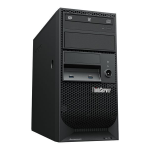
Despite its compact size, the T150 is well-constructed and comes with a padlock or Kensington lock for additional security. The top of the front panel is a slimline DVD drive, and below are two 5.25-inch device bays. For local backups, Lenovo provides an internal USB RDX drive. Within the BIOS, eight USB 3 ports can be enabled or disabled, one for each side of the device. Lenovo provides a VGA port at the back of the unit along with a DisplayPort connector.
There is a neat and tidy appearance inside the enclosure, and key areas to upgrade and maintain are easily accessible. In our review system, we included a single 1TB SATA drive in the lower cold-swap carrier, but the motherboard offers six SATA connectors in all, and the case has mounting holes for four LFF and one SFF drive.
Lenovo offers an optional RAID 520i PCI-Express card that adds hot-swap SAS3 drive support, but the server’s physical design does not lend itself to such a role.
The CPU is fitted with a heatsink, and there’s a 9cm cooling fan at the rear – but don’t worry, both fans are quiet enough not to annoy your inner librarian. In our experiment, we measured noise levels of 36dB from a distance of 1m using the SPLnFFT app.
Lenovo ThinkServer TS150: Performance
While Dell’s and HPE’s entry-level servers include embedded OS deployment tools, the TS150 does not. Our Windows Server 2012 R2 was loaded and ready for use within 20 minutes with the help of the EasyStartup disk. In addition, the TS150 supports Intel’s vPro and AMT (active management technology), but can’t compete with HPE’s visionary iLO4 server-management chip.
We configured this in the BIOS setup screens so we could plug a Gigabit Ethernet cable into this port and remotely monitor and control the server hardware via a web browser: that meant we could access settings, check the status, and regulate power states remotely.
In addition, adding a remote-management app offers even greater control. With Intel’s free Manageability Commander utility, we tested this: after providing the AMT IP address and credentials, the Commander connected to the server and displayed a variety of useful tools. The built-in remote desktop tool provided access to the server’s sensor data, event and alert logs, and the ability to control the BIOS screen and OS remotely.
With plenty of expansion options and good remote management capabilities, the ThinkServer TS150 offers a lot in a compact, quiet chassis. The on-site warranty is generous and includes an affordable option for small businesses. Lenovo is your best bet if you want a server powered by the latest Kaby Lake Xeon E3-1200 v6 CPU.
| Pros | Cons |
| Excellent management capabilities | No embedded OS deployment tools |
| Easy access to upgrades and maintenance | No hot-swap capabilities as standard |
| Affordable |


Verdict
With plenty of expansion options and good remote management capabilities, the ThinkServer TS150 offers a lot in a compact, quiet chassis. Lenovo is where you want to go if you want a server with a Kaby Lake Xeon E3-1200 v6 processor.


