Last Updated on November 1, 2026 by Daniel Osakwe
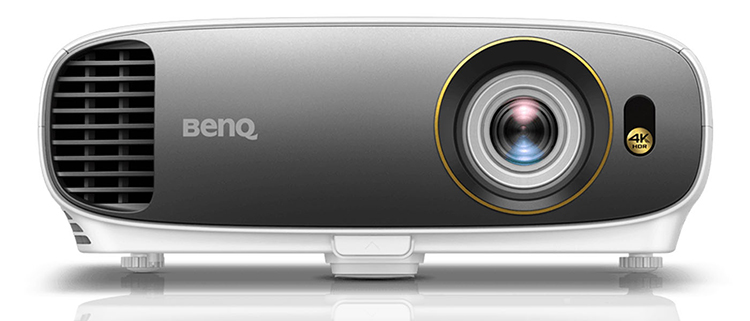
The BenQ HT2550 4K HDR projector is one of several new 4K projectors to hit the market in the last few months that is built around the 0.47″ UHD DLP chipset and sells for less than $1,500. Unlike some of the other 4K projectors under $2,000, the HT2550 is 3D capable, although it needs to be put into a native 1080p mode for 3D display. But for those who have a collection of 3D discs in 1080p HD resolution, this is a welcome feature.
Beyond 3D, the HT2550 has a few other handy features. It weighs under 10 lbs, so it is portable enough for backyard movie night or other transportable uses. It has a remarkably robust onboard speaker with an impressive dynamic range that is surprising for its size–again, a nice feature for temporary backyard use. And it has keystone adjustment, a feature that is missing from several of its competitors.
Table of Contents
BenQ HT2550 4K HDR Projector: Design
When you first take the BenQ HT2550 out of the box, you’ll notice its design: it’s a nice-looking device. Its design is clearly more functional than anything else, but that’s certainly not a bad thing, after all, no one will be buying a projector simply because it looks good. Still, we like the white-and-silver color scheme and the subtle curves, and we think the projector should look right at home in any home theater.
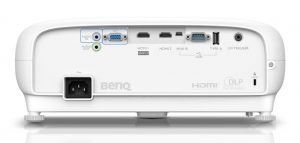
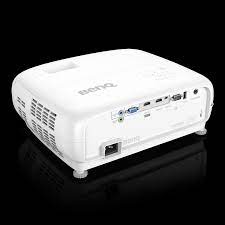
On the back of the device, you’ll find your inputs and outputs. While there isn’t a ton there, we think there’s pretty everything most will need: You’ll get two HDMI ports – one HDMI 2.0-compliant port that should be used for any 4K HDR content, and one standard HDMI port for anything else – plus you’ll also find a USB port for powering a device like the Roku Streaming Stick+, a 12-volt trigger, 3.5mm audio input and output, and a VGA input. It’s unfortunate that the USB port doesn’t support streaming files from a hard drive or USB drive, but not unexpected.
It’s not a bad selection, but there are times in which it might not be enough. For example, if you have more than one 4K HDR source you want to connect to the projector, you’ll want to use an A/V receiver or HDMI switch.
The projector is bulky, which is something to keep in mind. At 353 x 135 x 272 mm, it’s not unexpectedly huge, but you may want to consider mounting it from the ceiling if you plan on keeping it installed in your home, rather than taking it on the road.
Thankfully, the remote is relatively easy to use and it’s brightly backlit if you tap a “light” button at the top of the projector, which is very helpful for dark rooms.
At the top of the remote, you’ll find power controls and some picture settings controls, under which is a directional pad. Under that, you’ll get menu controls, playback controls, and more. Despite the big selection of buttons, you’ll be able to pick up the controls in no time.
BenQ HT2550 4K HDR Projector: Setup
Setting up the projector is really very easy. Simply take the projector out of the box, plug the power cord and source in, and turn it on. You may want to adjust things like keystone, zoom, and focus, but doing so is very easy given the relatively simple remote.
Unlike more expensive projectors, the BenQ HT2550 does not boast any lens shift features, so we recommend placing the projector on as horizontal of a plane as you possibly can. (Though, the projector boasts 1.2x optical zoom and features like automatic vertical keystone to help with the setup process, which is very nice.)
Sometimes, it’s simply not possible to place the projector horizontally, which is where the vertical keystone can help. There’s also a little kickstand on the bottom of the projector, which might also help ensure a quality picture.
Generally speaking, the BenQ HT2550 is very easy to install – though, if you plan on mounting it from the ceiling or need some electrical work done to properly install it, it’s wise to get professional help rather than go it alone.
The software on the projector is basic but functional. It looks a little dated, to be sure, and this isn’t a smart projector so you can’t connect to any devices through Wi-Fi. That said, when it comes to software, you’ll get simple on-screen menus so don’t go in expecting a complex smart platform like the kind you see on LG, Samsung, Sony, or other big-name smart TVs.
BenQ HT2550 4K HDR Projector:Performance
In testing the BenQ HT2550 projector, we set it up in a few different environments that included several different lighting situations. Of course, in all fairness to the projector, most of the testing was done from around 11 feet away in a large darkroom – and in that environment, the projector is a stunner.
With both a 4K resolution and HDR support, the HT2550 projects at up to 2,200 lumens. While it’s not the highest brightness projector out there, it performed extremely well in most of our tests. Sure, environments with more light simply won’t look as good, but as long as the light isn’t over-the-top, it should do just fine.
Perhaps just as important as the projector’s brightness, however, is its color accuracy: The beautiful colors on offer in Planet Earth II were on full display here, as were the details to be found in Stranger Things. Pretty much everything we watched on this projector was detailed and clear, provided relatively good environments.
Outside of the usual specs, the BenQ HT2550 also has a few of its own tricks up its sleeve. For example, it has a unique HDR processing that’s aimed at providing a balance between contrast and color accuracy. We found that it looked quite good and while perhaps not as stunning as some more expensive projectors, it’s still far better than what you’ll get from basic SDR content.
Despite the bright colors and heavy detail, the contrast on offer wasn’t quite as high as we might have liked. You’ll see grayish letterbox bars around the image that are pretty noticeable, and that may be a concern for some that are looking for only the highest quality image. For most, however, we think the picture will do perfectly fine.
The BenQ HT2550 also boasts a built-in speaker, and it was actually pretty impressive. Now, to match the stunning image on offer you’ll definitely want to invest in at least a decent soundbar, if not a surround sound system – but in a pinch, the built-in speakers can convey the message with some depth, and get loud enough for moderately-sized rooms.
Speaking of sound, though, there’s definitely some noise emitted from the fan in the projector, but in our view, it’s not too excessive. Decent speakers and smart projector placement can help cut out that noise too.
Overall, for the price, the BenQ HT2550 is a stunning projector. While black levels may not be as dark as they could be, colors are bright and detail is high even if your living room setup allows some light in the room.
Limitations
Focus: When we first tested the HT2550, we reported that our test sample did not allow perfect focus across the entire screen. This appears to be related to it being an early unit, which used a lens that BenQ says has since been upgraded. When we tested the BenQ TK800, which differs primarily in its color wheel and also has the upgraded version of the lens, it focused sharply from edge to edge across the screen. So did the new HT2550 test unit for this review. Nonetheless, be prepared to spend some time tuning the best possible focus, as small movements of the focus control can produce rather large effects on the screen. Once dialed in, though, you shouldn’t need to touch it again unless you move the projector.
The dark frame around the image: This projector creates a very dark but not perfectly black frame around the projected image. The frame is about 4.5% of the picture width. So for a 120″ diagonal image (105″ in width), the projected dark frame is almost 5″ wide around the entire active area of the 16:9 image. If you are projecting onto a screen with a black 3″ wide frame, a bit of the projected dark frame will fall onto the wall around the screen. If the wall is white and you are in a dark viewing room this may be visible. So far, this is an artifact we notice on all of the projectors that have the 0.47″ UHD DLP chip, so it is not unique to the HT2550.
3D Manual Settings: The BenQ HT2550 has 3D for 1080p sources only (not 4K). This is not unusual for UHD projectors as there is no 3D standard for 4K UHD Blu-rays. However, the projector will not automatically recognize a 3D source signal. You must go into the menu and turn 3D on in order for it to play properly. Once 3D is turned on, any subsequent 4K material being displayed will be projected in native 1080p until you go back into the menu to turn 3D off.
Pros
- 4K HDR support
- Excellent color accuracy
- Bright in most situations
- Decent audio quality
Cons
- Slightly limited port selection
- Blacks could be deeper


Conclusion
The BenQ HT2550 is an exciting projector simply because it is 4K resolution at $1,499, and especially because it also offers playback of 1080p 3D at its budget price. This combination of factors will put it high on the shortlist of many users who have an investment in 3D discs. However, there is more 4K competition with 3D than there was when we first reviewed the HT2550, including BenQ’s own TK800, which means you’ll need to compare other features as well.
For those who have no interest in 3D, the value of the HT2550 is a question of trade-offs against the other 4K projectors selling at or near the same price point. ViewSonic and Optoma, in particular, have significantly stepped up their games with impressive products that include higher contrast and unique features of their own. With this sudden rush of inexpensive 4K models, BenQ is facing some inspired and determined competitors intent upon taking their own fair share of the home theater market. The result going forward will be more features and performance at lower prices across the board–a development we can all celebrate.


