Last Updated on November 1, 2026 by Daniel Osakwe
When you need to bring multiple technology devices with you on a journey, you’ll quickly realize how important power is. That’s why I was instantly interested in the powerful OmniCharge 20+ 20000mAh laptop power bank. Originally, it caught my eye because of its sleek and compact design which would make it easy to travel with.
After some research, I realized that it also comes with many additional features that make it super useful for charging a wide variety of devices. However, will this device be able to live up to its reputation? To find out more about what this OmniCharge 20+ 20000mAh laptop power bank can offer, continue reading my OmniCharge 20+ 20000mAh laptop power bank review.
Table of Contents
Omni 20+ Wireless Laptop Power Bank
Omnicharge Omni 20+ is a special kind of power bank that attempts to be everything to everyone. Aside from the decent 71Wh capacity and the variety of input and output options, such as USB-C and Qi charging, it actually approaches the competition in many ways.
To see how well the Omni 20+ can stand-in for all the chargers I normally pack, I recently slipped an Omni 20+ into my messenger bag. During a week of usage and testing, I was able to get a feel for how well the Omni 20+ charges a variety of devices, and how well it performs.
OmniCharge 20+: Specs
- Product Name: 20+ Wireless Power Bank
- Product Brand: Omni
- Product Dimensions: 5 x 4.8 x 1.1 in.
- Color: Black
- Capacity: 18650mAh Li-ion
- Output: 100W (outlet), 60W (USB-C), 10W (wireless)
- Warranty: One year
OmniCharge 20+: Design
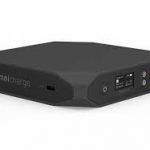
This is a brilliant-looking device with a dark case and gem-cut edges that blend well with my HP Spectre x360. This design is devoid of any markings at the top or bottom, hiding an embedded Qi wireless charger in the top, and the few labels at the top and bottom are inconspicuous.
There are multiple inputs and outputs on this device, which helps reduce cord clutter a bit. Although I prefer power bricks that allow you to plug everything into one side, the Omni 20+ is set up more cleanly than some I have used before.
It is the choice to use soft-touch rubber that really bothers me about the design. This material looks good now, and it feels good, and I suppose it helps absorb some shock when packed away for travel, but it’s just not made for the long haul. As rubber degrades and becomes sticky over time, it attracts lint and dust, as well as becoming quite unpleasant to touch.
Most USB-C devices can be fast-charged and can be powered by 60W through the USB-C port.
I would like to see a different material used for the case of a premium device like the Omni 20+.
OmniCharge 20+: Initial Setup
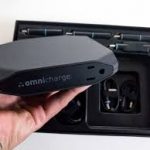
The Omni 20+ clearly demonstrates lots of thought and care has gone into its design—but little thought has gone into its packaging and documentation. The battery itself is in the box, along with two USB-C to C cables and a couple of brochures. There is a brochure that says it’s a quick start guide, but it’s not.
Due to the confusing nature of the display and controls, this presentation is lacking a charging cable as well as an instruction manual.
On the Omni 20+, you can see that both the barrel jack and USB-C plug are labeled IN/OUT, meaning you can charge your battery or other devices through these ports.
To connect the Omni 20+ to the BESTEK power strip tower I keep at my desk, I tried using the included USB-A to C cable, but it didn’t work. In some way, the circuitry in the power strip USB ports and the Omni 20+ were not communicating correctly, causing the charging process to repeat over and over at very short intervals.
I also tried the USB-Charger provided with my Nintendo Switch, and it worked perfectly. The Omnicharge website shows, but it’s not in the box, that it works with USB-C chargers up to 45W or with barrel connectors with a voltage range ranging from 4.5 to 36V.
To fully calibrate the battery, you’ll need to fully discharge it, then fully recharge it again. With USB-C, you can just plug in any device and it will power on, but if you want to charge using the power outlet, barrel connector, and USB-A ports, you must use the somewhat confusing LCD display. It’s not too complicated, but I did have to download the Omnicharge instructions PDF from the official site.
OmniCharge 20+: Display
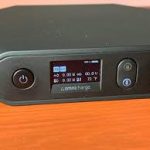
Although the display is small, it is quite bright and easy to read. The only drawback is that you need an instruction manual that isn’t included in the box to figure out what each icon represents or to change the input and output settings.
In the previous paragraph, I discussed the problem with the manual, so suffice it to say that instead of wasting time and energy trying to figure out the display and controls on your own, I recommend downloading the manual from the Omnicharge website.
OmniCharge 20+: Sockets and Ports
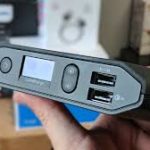
There are a wide variety of sockets and ports on the Omni 20+ to cover all of the bases. In addition to the USB-C port, there is a barrel connector port that can be used to charge other devices.
Most USB-C devices can be fast-charged and can be powered by 60W through the USB-C port. Despite not being universal, this worked for my Pixel 3 and several other devices I had at hand for testing.
Laptops and other devices that normally need an external power source can be powered with the barrel port. Nevertheless, you will need an adapter tip for your device and a barrel plug with 5.5 x 2.1mm.
In addition to having a barrel connector and an adapter tip on hand, I was able to leave my power adapter at home and charge my HP Spectre on the road. For a power bank in this price range, I would expect the necessary hardware to be included.
The main benefit of this power bank is that it offers pass-through charging, so your devices won’t be left without power all day.
The Omni 20+ does include a perfectly functional AC outlet on the other side if you don’t mind traveling with additional adapters or you have devices that won’t charge through the included USB-C port. I use the power outlet as a backup, not something I use every day, even though it’s a nice touch for compatibility reasons.
You’ll find two USB-A ports on the front, right next to the display. All your USB devices can be charged through these ports. One is a Qualcomm 3.0 quick charge port, and the other is a standard USB port that can output 3A.
OmniCharge 20+: Battery
For a power bank of this size and price, the Omni 20+ comes with a 20,000mAh battery. Based on the price of this unit, I would prefer a larger battery, but I realize you’re paying for wireless charging and fast USB charging instead.
Despite the bulky battery and 17-hour runtime of my HP Spectre x360, I was still able to get a considerable boost from the Omni 20+. In my testing, I was able to get four charges out of the Omni 20+ with a little leftover.
The main benefit of this power bank is that it offers pass-through charging, so your devices won’t be left without power all day. Therefore, the Omni 20+ can also function as a universal power adapter in addition to a power bank by charging or powering your devices at the same time.
I found the Omni 20+ work well as a substitute for bulky power adapters for my laptop, phone, and other devices when I could plug it in.
Using an appropriate USB-C charger like my Nintendo Switch charger, the Omni 20+ takes about three hours to charge to full. With a weaker charger, or over the barrel connector, it takes longer to charge.
Charging Speed
In general, the Omni 20+ can charge each device as fast as it was intended to be charged. Standard USB-A ports can charge older devices, but they draw up to 3 A and charge quite slowly. For those with Qualcomm 3.0 compatible devices, you can plug them into the appropriate USB port and enjoy faster charging.
Whenever I plugged my Pixel 3 into a USB-A port, regardless of where I placed it, I was forced to draw 1.46A. Other devices drew 0.37 to 1.46A.
Using the USB-C cable included with the phone, I found that charging the Pixel 3 through the USB-C port was just as fast as if I was using the factory charger. When plugged in via USB-C, it drew 11 watts of power and entered its “charging rapidly” mode. When I plugged in the factory charger, the speed did not change at all.
My Nintendo Switch and other USB-C devices also charged without any issues.
Whenever I had power available, I plugged in the Omni 20+ to replace the bulky array of electrical adapters I used for my laptop, iPhone, and other devices.
My experience with other 10 watt Qi chargers has been similar, as this one can put out 10 watts as well. Getting a handle on it quickly is a bit touchy in terms of positioning.
| Pros | Cons |
| Wireless charging | Icons are difficult to understand |
| Small and compact | Costly |
| Crisp, clear LCD display | |
| High power over USB |


Final Verdict
With a price like that, Omnicharge Omni 20+ had better be a great power bank. When you need a high-power USB-C port, wireless charging, barrel connector input and output, and a regular power outlet, then this is the power bank you want. A power bank with this feature set may cost less, but it won’t provide as much juice as this power bank.