
Last Updated on November 1, 2026 by Daniel Osakwe
Brother MFC-J5330DW printer, sometimes simply called Brother MFC-J5330DW, is an all-in-one inkjet machine crafted for an efficient printing experience. This entry-level multifunctional device facilitates the quick and accurate print of both text documents and photos alike, while the low cost per page printing helps to save some costs. Additionally, Brother MFC-J5330DW is equipped with wireless connectivity that allows mobile printing from virtually any location in your house or office.
Table of Contents
Brother MFC-J5330DW: The Review
In a reasonable price range, this four-in-one MFP offers a deep 250-page A4 paper tray, rapid 22 pages per minute churn rate, as well as duplex printing. You have an office printer that might be indispensable if it can print on A3 paper.
Despite the fact that it looks like a traditional multifunction printer, the Brother MFC-J5330DW has more to offer than meets the eye. The machine is capable of printing on A3 paper as well.
The Brother MFC-J5330DW’s deep 250-page paper tray, rapid double-sided (two-sided) print speeds, fax capability, and 50-page ADF (automatic document feeder) all lend this printer to the small or medium business market. Obviously, this isn’t a home printer, so there aren’t any consumer-friendly features like an SD card slot or NFC, but you will find Ethernet and Wi-Fi connectivity along with your standard USB port.
A lot of people who want to print photos on photo paper will like the J5330DW because it has a good resolution of 4,800 x 1,200 dpi, and its scan resolution is only slightly lower at 2,400 x 1,200 dpi.
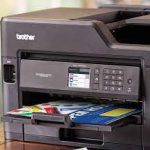
A3 paper can be loaded one sheet at a time, which allows full-color posters or booklets to be printed on the printer.
Brother MFC-J5330DW: Design and build
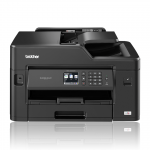
Compared with the Canon Maxify MB2750, the MFC-J5330W just takes up a bit more desk space. Due to its ability to accept A3, it is in a different category altogether. With A4 sheets loaded into the tray in portrait orientation, the drawer does not stick out in an awkward way, as they do with most A4 printers. Alternatively, you can extend the tray and fill it with 250 sheets of A3 paper. However, the bed of the scanner is only large enough to hold an A4 document.
Inkjet printers like the J5330DW retail for £190.80 (about $250, AU$325), and its four cartridges can be accessed via a front flap. To see the printer heads and plug-in Ethernet and USB cables, the top half of the printer opens. To prevent accidental unplugging of the cables, Brother has placed these ports on the inside with the wires leading out the back.
An ADF holds 50 pages at a time for scanning and copying. There’s also a document feeder at the rear to handle envelopes, sheets, and the like.
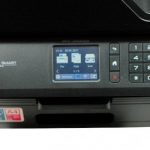
Controls are controlled by a small, but still very user-friendly, color touchscreen. The numerical keypad swivels upward for easy access along with a hard button.
SPEC SHEET
The following are the full specifications of the Brother MFC-J5330DW:
- Type: Multifunction color inkjet printer
- Functions: Print, copy, scan, fax
- Ink: 4 cartridges
- Connectivity: Ethernet, Wi-Fi, Wi-Fi Direct, USB
- Data storage slot: USB port
- Print speed: 22 ppm (mono), 20 ppm (color)
- Main paper tray capacity: 250 sheets
- Print quality: 4,800 x 1,200 dpi
- Scan quality: 2,400 x 1,200 dpi
- Apple AirPrint: Yes
- Google Cloud Print: Yes
- App support: Yes (iOS/Android)
- Consumables included: 4 ink cartridges
- Size/Weight: 304 x 530 x 398mm (H x W x D); 16.9kg
Brother MFC-J5330DW: Features
Brother’s four-in-one MFP can print, scan, copy, and fax like a champ. Like most models geared toward small to medium businesses, it provides both Ethernet and Wi-Fi connectivity, the latter of which includes Wi-Fi Direct for making a wireless connection without using a router.
Wireless printing and scanning are also possible using the excellent companion app. For iOS and Android devices, you can download the Brother iPrint & Scan app.
We found print speeds to be slower than the claimed 22 ppm (pages per minute) for mono and 20 ppm for color. Although it prints on both sides of the page, it also can print A5 booklets, a feature that is available only on A3 printers.
The inkjet printer will require you to purchase expensive cartridge refills throughout its lifetime, but its cost is no higher than that of rival brands. There are four colored ink cartridges, so you don’t have to replace them all at once, and the high-yield XL cartridges can print as many as 1,500 pages (about $26 to AU$36 each).
Brother MFC-J5330DW: Setup and operation
The touchscreen display on the Brother MFC-J5330DW takes you through a rather time-consuming setup process, which includes entering the time, date, and Wi-Fi information. The setup wizard instructed us to remove the four ink cartridges and replace them again after fitting them. It is most likely that we made a mistake the first time around.
Setting up the printer is very thorough, and a colorful test page is printed to ensure that the print heads are aligned properly – which they were.
Due to the logical touchscreen display, the MFC-J5330DW was very easy to use. We did not have trouble typing in Wi-Fi passwords despite its small size with its 2.7-inch screen and Qwerty keyboard.
Using the companion app, we had only one problem when updating the firmware over Wi-Fi. To download and install it, we had to attach an Ethernet cable and use the printer’s touchscreen interface. It was necessary to reinitialize the printer when switching from Wi-Fi to wired.
Brother MFC-J5330DW: Performance
Despite its stylish design, it produced superior quality monochrome prints to the Canon Maxify MB2750. There is no smearing or running of the text in bold pigmented black. While the ink looks heavy, it is consistent compared to a laser printer.
With bold inks, charts and pictures are brought to life, and nastiness is not smudged or blocked. Besides printing photos on photo paper, it also does a good job. While office inkjets are notorious for a lack of precision when shading, these results looked both natural and vivid.
Despite this, we weren’t able to achieve the manufacturer’s quoted print speeds. We experienced an almost six-second FPOT (first page out time), and printing an A4 picture took a considerable amount of time. Compared to the recommended 22 pages per minute, consecutive plain text pages were much closer to the actual speed.
| Pros | Cons |
| Cable management is neatly organized inside | It takes forever for some photos to print |
| MFPs can print in A3 and A4 sizes | A lengthy setup process |
| Black pigment printing that is reliable and sharp | |
| It shows how much ink you have left through the companion app |


Verdict
The Brother MFC-J5330DW is a four-in-one multifunction printer that performs well across the board. The device is well-specified, only lacking NFC and an SD card slot, however. Despite its small footprint, it is quite well-designed in terms of the way that it manages cables internally and can accommodate paper up to A3, even though its footprint is not much larger than that of the average A4 MFP.
In addition to its competitive pricing, this device’s biggest advantage is its A3 capability, which allows it to print high-quality color posters and booklets.


